

wprotectmanager.exe belong to WPM17.8.0.3297 module developed by Cherished Technololgy LIMITED in the database contains 1 versions of the wprotectmanager.exe signed file and file md5 is f4efdf37d84a555ecf75f9944c7d6945.
Sweet-page.com redirect virus removal instructions
Sweet-page.com is a browser hijacker created by a company called Wify Technology Limited. This browser settings altering adware infiltrate user's Internet browsers thought free software downloads and changes browsers homepage and default search engine to sweet-page.com At the time of research this browser hijacker was promoted using a deceptive free software download client developed by DomaIQ. Computer users should know that nowadays most of free software download websites are using download clients - a small program that offers installation of some advertised browser plug-ins with the chosen freeware. Internet users who don't pay close attention to the freeware downloading steps could easily end up installing sweet-page.com browser hijacker or other potentially unwanted applications.
This adware is especially rogue because it changes Internet browsers (Internet Explorer, Google Chrome, and Mozilla Firefox) shortcut targets thus blocking users attempts to change their homepage and default search engine settings. At the time of research sweet-page.com was redirecting it's users to search.yahoo.com - a legitimate Internet search engine; however, computer users should be aware of the fact that creators of this browser hijacker can redirect their users to some malicious website at any given time and thus it's recommended to eliminate this browser hijacker from one's Internet browsers as soon as possible.
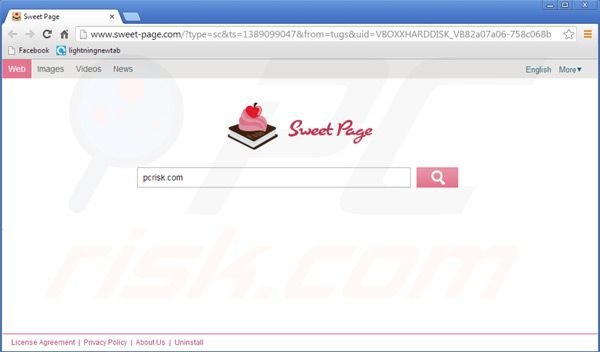
Sweet-page.com browser hijacker is identical to previously discovered adware which redirected Internet users to Do-search.com, Aartemis.com, isearch.omiga-plus.com and NationZoom.com To avoid installation of such potentially unwanted applications, computer users should be very attentive when downloading and installing free software. If your download is managed by some download client be sure to inspect every download step and opt-out installation of advertised browser plug-ins by clicking on a "decline" button. When installing the recently downloaded free program always choose "advanced" or "custom" installation options instead of "quick" or "typical," this step could reveal installation of bundled adware. If your Internet browsers already redirect you to sweet-page.com website use this removal guide to eliminate browser settings altering adware from your computer.
Sweet-page.com virus removal:
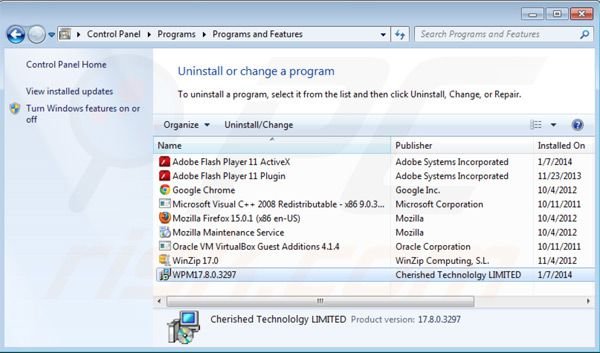
Windows 7 users:
Click "Start" ("Windows Logo" in the bottom left corner of your desktop), choose "Control Panel".
Windows XP users:
Click "Start", choose "Settings" and click "Control Panel". Locate and click "Add or Remove Programs".
Windows 8 users:
Right-click in the screen’s bottom-left corner, select Control Panel. In the opened window choose "Uninstall a Program".
In the uninstall programs window: look for "WPM17.8.0.3297" select this entry and click " Uninstall" or "Remove".
After uninstalling potentially unwanted programs which causes browser redirects to Sweet-page.com website scan your computer for any left unwanted components. To scan your computer userecommended anti-spyware software. Remove all of the entries that this program detects to make sure your PC is clean from any possible spyware and malware infections.
By downloading any software listed on this website you agree to our Privacy Policy and Terms of Use. We are affiliated with anti-virus and anti-spyware software listed on this site. All the products we recommend were carefully tested and approved by our technicians as being one of the most effective solutions for removing this threat.
Sweet-page.com homepage and default search engine removal from browsers:
Video showing how to remove potentially unwanted browser add-ons:
Remove Sweet-page.com virus from Internet Explorer:
Fix Internet Explorer shortcut target:
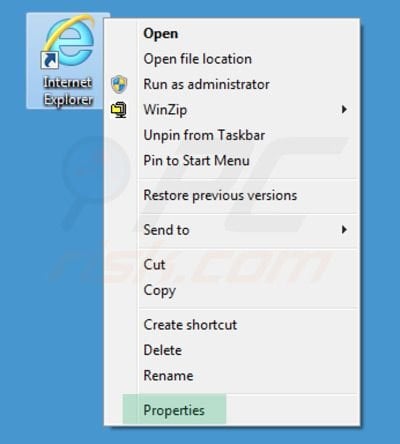
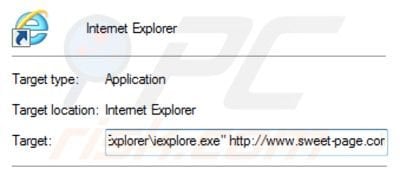
This browser hijacker changes the "Target" field of one's Internet Explorer shortcut. To fix this - locate your Internet Explorer shortcut on your Desktop and click the right mouse button over it. In the opened menu choose "Properties". In the opened window locate Target field and eliminate text (hxxp://www.sweet-page.com/...) which is entered after "C:\Program Files\Internet Explorer\iexplore.exe".
Change homepage:
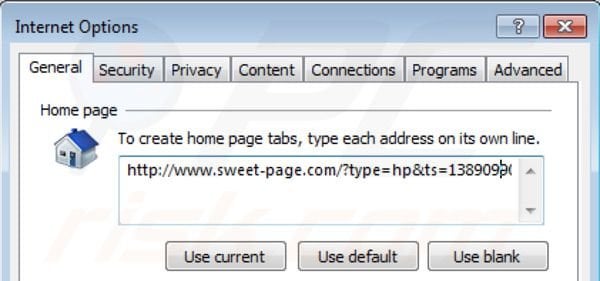
Click "Tools" (or the gear icon in Internet Explorer 9) select "Internet Options", in the opened window remove Sweet-page.com and enter your preferred domain which will open every time you launch Internet Explorer.
Change default search engine:
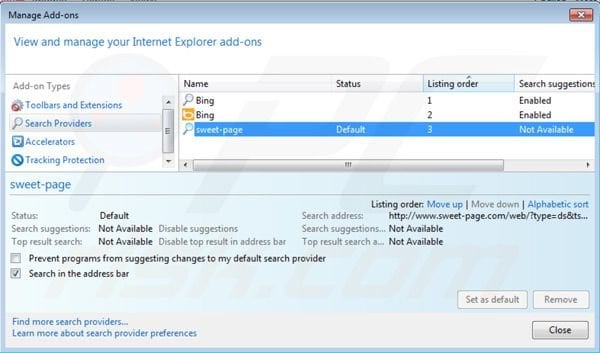
Click "Tools" (or gear icon in Internet Explorer 9), select "Manage Add-ons". In the opened window select "Search Providers", set "Google", "Bing" or any other preferred search engine as your default and then remove "sweet-page".
If you continue having problems with redirects to Sweet-page.com you can reset you Internet Explorer settings to default.
Windows XP users: Click "Start", click "Run", in the opened window type "inetcpl.cpl". In the opened window click on "Advanced" tab, then click Reset.
Windows Vista and Windows 7 users: Click the Windows logo, in the start search box type "inetcpl.cpl" and click enter. In the opened window click on "Advanced" tab, then click Reset.
Remove Sweet-page.com virus from Google Chrome:
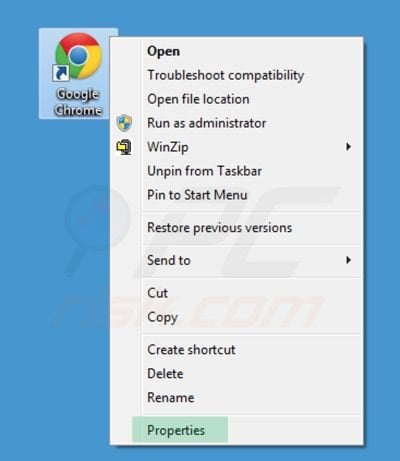
Fix Google Chrome shortcut target:
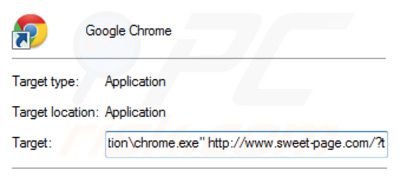
This browser hijacker changes the "Target" field of one's Google Chrome shortcut. To fix this - locate your Google Chrome shortcut on your Desktop and click the right mouse button over it. In the opened menu choose "Properties". In the opened window locate Target field and eliminate all text (hxxp://www.sweet-page.com/...) which is entered after "C:\Program Files\Google\Chrome\Application\chrome.exe"
Remove Sweet-page.com related browser extensions:
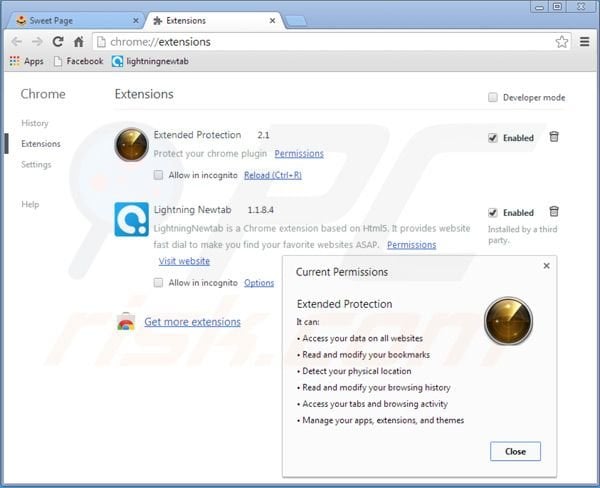
Click on bars icon (top right of the screen), select "Tools" and click on "Extensions". Locate "Extended Protection" and "Lightning Newtab" select them and click on a trash can icon.
Change homepage:
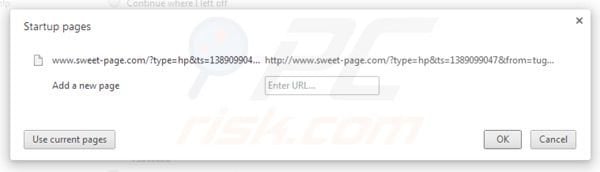
Click on the wrench (bars) icon, select "Settings". In "On startup" section click "set pages", hover your mouse over sweet-page.com and click the x symbol. Now you can add your preferred website as your homepage.
Change default search engine:
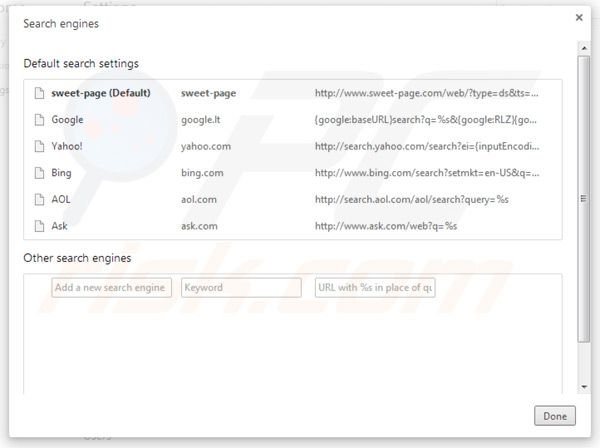
To change your default search engine in Google Chrome: Click on the "Bars" icon (top right corner), select "Settings", in "Search" section click "Manage Search Engines...", remove "sweet-page" and add or select your preferred.
Remove Sweet-page.com virus from Mozilla Firefox:
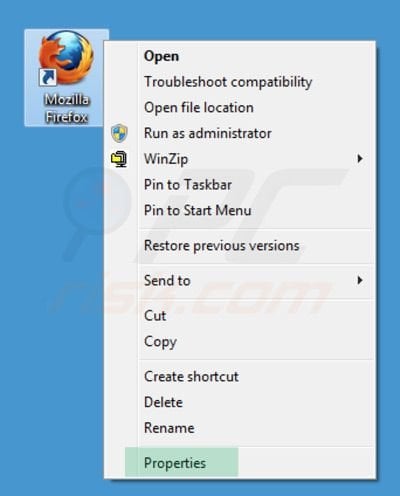
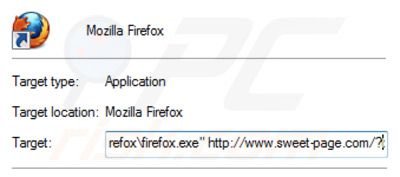
Fix Mozilla Firefox shortcut target:
This browser hijacker changes the "Target" field of one's Mozilla Firefox shortcut. To fix this - locate your Mozilla Firefox shortcut on your Desktop and click the right mouse button over it. In the opened menu choose "Properties". In the opened window locate Target field and eliminate all text (hxxp://www.sweet-page.com/...) which is entered after "C:\Program Files\Mozilla Firefox\firefox.exe"
Change homepage:
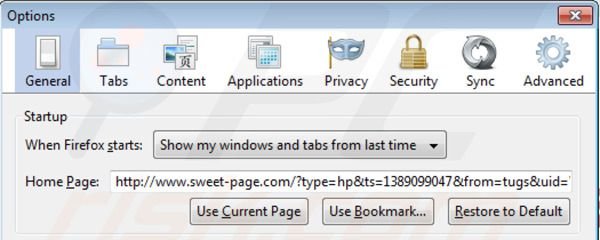
Click "Firefox" (at the top left of the main window), then select "Options", in the opened window remove Sweet-page.com and enter your preferred domain.
Change default search engine:
In the URL address bar, type about:config and press Enter.
Click "I'll be careful, I promise!".
In the search filter at the top, type: "sweet-page.com"
Right-click on the found preferences and select "Reset" to restore default values.
Click "I'll be careful, I promise!".
In the search filter at the top, type: "sweet-page.com"
Right-click on the found preferences and select "Reset" to restore default values.
Optional method:
If you continue having problems with redirects to Sweet-page.com you can reset you Mozilla Firefox settings to default.
Open Mozilla Firefox, at the top left corner of the main window click "Firefox", in the opened drop down menu choose Help and then click on Troubleshooting Information, in the opened window click on "Reset Firefox" button.